
Benutzer, Gruppen und Rollen
Erstellen Sie Benutzer und gruppieren Sie sie nach Abteilung, Geschäftseinheit, Kostenstelle, Standort, Finanzteam, Beschaffungsteam, Betriebsteam, Genehmiger-Gruppe oder Führungsebene.
Diese Seite wurde mit KI übersetzt und kann Ungenauigkeiten enthalten.
Enterprise Resource Planning
Dieses ERP-System ersetzt unverbundene Altsysteme durch eine Plattform für Finanzen, Beschaffung und Bestandsführung. Eine doppelte Buchführung, Materialbedarfsplanung (MRP) und Anlagen-Lifecycle-Tracking sind fest im Kern integriert, sodass Daten nicht mehr zwischen getrennten Systemen abgeglichen werden müssen. Die Plattform erstellt konsolidiertes Finanzreporting und Echtzeit-Audit-Trails ohne Ausfallzeiten und läuft unter rollenbasierten Zugriffskontrollen, die multinationalen Organisationen eine verlässliche Betriebsgrundlage geben. Im Vergleich zu typischen Enterprise-Lizenzen pro Nutzer liegt der Einstieg so, dass sich die Anfangsinvestition schnell amortisieren kann und danach dauerhaft Einsparungen gegenüber laufenden Abogebühren entstehen. Weil Volt X jedes Produkt an Ihre Arbeitsweise anpasst, können Effizienz- und Performance-Gewinne im Alltag diese Amortisation weiter vorziehen und den Return on Investment früher sichtbar machen.
Ein starkes ERP ist nicht nur Back-Office-Software. Es ist das operative Rückgrat, das Finanzen, Beschaffung, Inventar, Lieferanten, Genehmigungen, Berichtswesen und operative Entscheidungen verbunden hält. Volt X ERP bringt die wesentlichen Grundlagen der Unternehmensressourcenplanung in ein Produktsystem, das um Ihre Organisation herum geformt werden kann. Es hilft, fragmentierte Tools, manuelle Abstimmungen, getrennte Genehmigungen und tabellengestützte Berichterstattung durch eine kontrollierte Geschäftsumgebung zu ersetzen.
Volt X Vorteile
Volt X ERP ist um die wesentlichen Fähigkeiten aufgebaut, die von einem ausgereiften ERP-System erwartet werden. Es umfasst Finanzmanagement, Beschaffung, Lieferanten, Inventar, Lieferkette, Kundenaufträge, operative Workflows, Genehmigungen, Berichtswesen, Kontrollen und Sichtbarkeit der Geschäftsleistung.
Der Vorteil ist, dass diese Fähigkeiten nicht in ein generisches Betriebsmodell eingesperrt sind. Sie können um Ihren Kontenplan, Ihre Genehmigungshierarchie, Beschaffungsrichtlinie, Bestandsregeln, Lieferantenstruktur, Geschäftseinheiten, Berichtssprache und Managementkontrollen herum geformt werden.
VOLT X VORTEIL 1
ERP-Daten brauchen sorgfältige Kontrolle. Nicht jeder Benutzer sollte jeden Finanzdatensatz, Lieferantenvertrag, jede Rechnung, jedes Budget, jeden Zahlungsstatus, jede Bestandsanpassung oder jedes Führungs-Dashboard sehen. Gleichzeitig brauchen verschiedene Teams unterschiedliche ERP-Dashboards, weil sie verschiedene Teile des Geschäfts verfolgen. Finanzteams brauchen Umsatz-, Kosten-, Cashflow-, Verbindlichkeiten-, Forderungs- und Budgetansichten. Beschaffungsteams brauchen Bestellanforderungen, Lieferantenaktivität, Genehmigungen und Ausgabenstatus. Betriebsteams brauchen Bestands-, Auftrags-, Fulfillment- und Arbeitsbelastungsansichten. Die Führung braucht Sichtbarkeit von Geschäftsleistung, Risiko und Kontrolle.
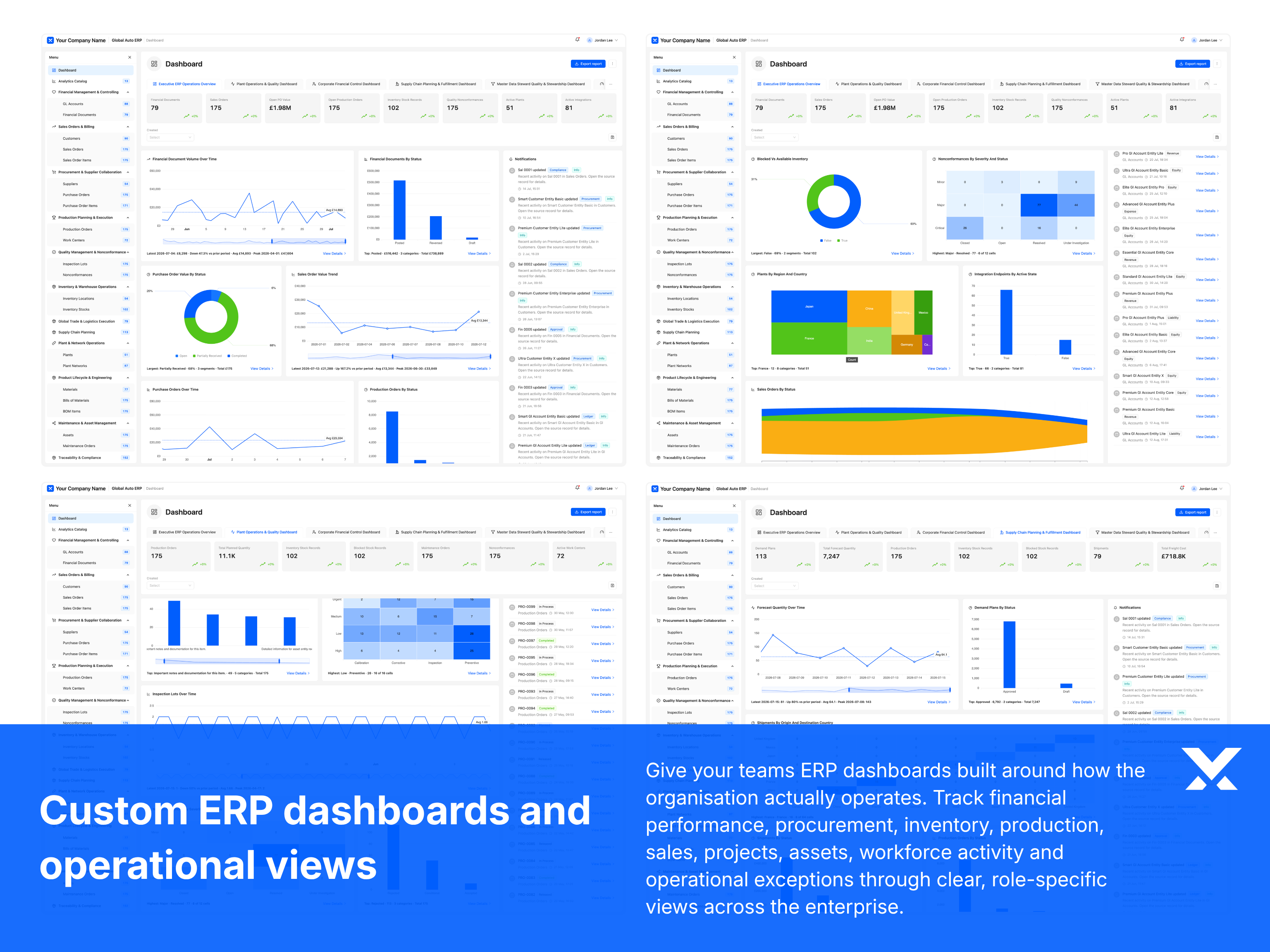
Volt X ERP enthält Benutzer, Benutzergruppen, Rollen und Berechtigungen zusammen mit einem vollständigen Katalog individueller Dashboards, die auf Ihr Betriebsmodell zugeschnitten sind. Dashboards können um Ihre Abteilungen, Geschäftseinheiten, Kostenstellen, Genehmigungsstufen, Lieferanten, Bestandskategorien, Auftragstypen, Finanzperioden und Berichtsformat herum gestaltet werden. Jedes Dashboard kann Rollen und Berechtigungen zugeordnet werden, sodass jeder Benutzer die richtigen Informationen und Aktionen für seine Arbeit sieht.
Gutes RBAC und Dashboard-Design arbeiten zusammen. Volt X kann Zugriff und Workspace-Ansichten so konfigurieren, dass jeder Finanzbenutzer, Beschaffungsmanager, Bestandscontroller, Genehmiger und Leader die Datensätze, Metriken und Kontrollen sieht, die er für seine Rolle braucht.
VOLT X VORTEIL 2
Nicht jede Organisation braucht dieselben ERP-Module. Einige brauchen Finanzen, Beschaffung und Inventar. Einige brauchen Kundenaufträge, Projektbuchhaltung, Spesen, Anlagen, Verträge, Fertigung, Servicebetrieb, Lagerverknüpfungen, Compliance-Workflows oder Management-Reporting. Ein individuelles ERP sollte Ihnen erlauben zu wählen, was zum Produkt gehört.
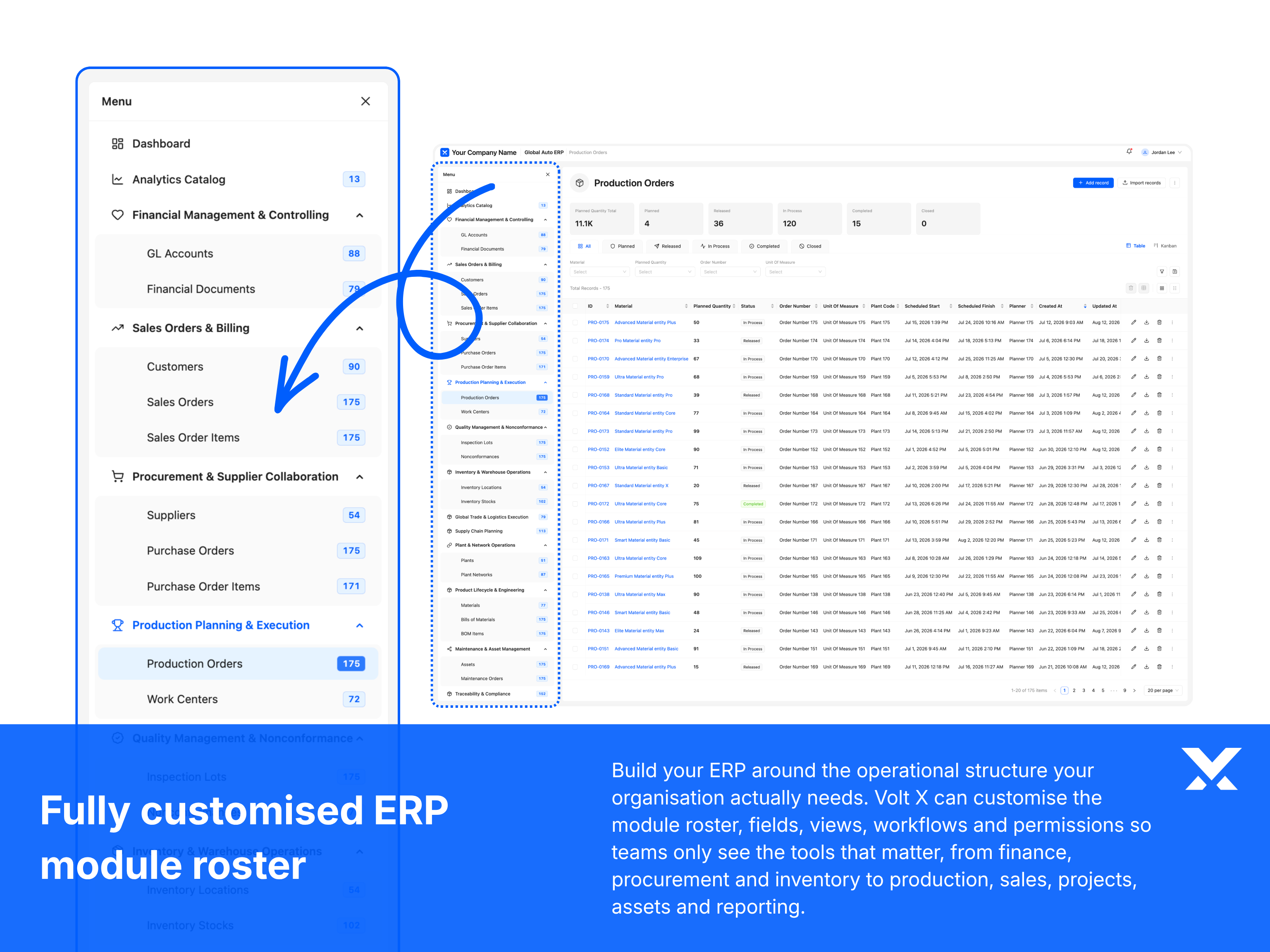
Volt X ERP startet mit einem ausgereiften Modulkatalog, aber jedes Modul kann angepasst werden. Sie können die Module behalten, die Sie brauchen, die entfernen, die Sie nicht brauchen, Module mit Ihrer eigenen Geschäftssprache umbenennen und Formulare, Felder, Workflows, Berichte, Berechtigungen, Dashboards und Exporte in jedem Modul anpassen.
Dies gibt Ihnen den Vorteil eines ausgereiften ERP-Ausgangspunkts, ohne in eine feste Betriebsstruktur eingesperrt zu sein. Volt X kann das Produkt um die Module formen, die Ihre Teams tatsächlich brauchen.
VOLT X VORTEIL 3
Nicht jede Organisation bewegt Finanzen, Beschaffung, Inventar und operative Arbeit durch denselben Prozess. Einige Teams brauchen Budgetprüfungen bevor Bestellanforderungen erstellt werden. Einige brauchen Finanzprüfung bevor Rechnungen gebucht werden. Einige brauchen Genehmigungsketten, Bestandsvalidierung, Lieferanten-Onboarding, Periodenabschlussschritte oder Ausnahmebehandlung bevor Transaktionen abgeschlossen sind.
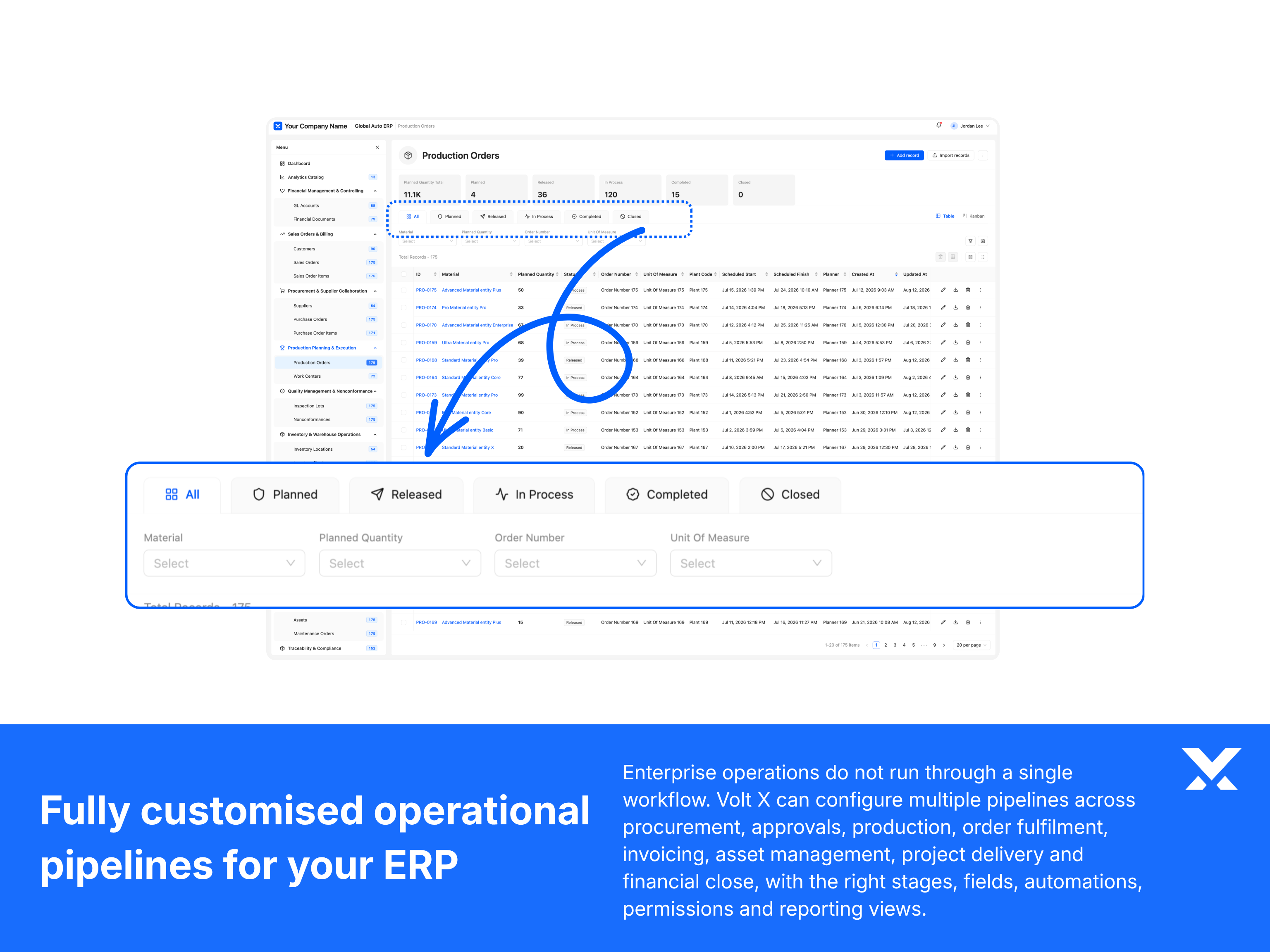
Volt X ERP startet mit einer ausgereiften Workflow-Grundlage, aber Pipelines und Prozesse können um Ihren tatsächlichen Betriebsrhythmus herum angepasst werden. Sie können Stufen umbenennen, Schritte hinzufügen oder entfernen, Felder anpassen, Filter konfigurieren, Berichtsansichten anpassen und Automatisierungen um die Art und Weise formen, wie Ihr Team einkauft, bucht, genehmigt, lagert, ausliefert und über Geschäftsaktivitäten berichtet.
Dies gibt Ihrer Organisation Pipelines und Prozesse, die reales Betriebsverhalten widerspiegeln, anstatt Teams in eine generische Struktur zu zwängen. Benutzer können Transaktionen klar verfolgen, Übergaben ordnungsgemäß verwalten und über die Stufen berichten, die tatsächlich wichtig sind.
VOLT X VORTEIL 4
Ein ERP funktioniert nur, wenn Finanz-, Beschaffungs-, Betriebs- und Führungsteams es tatsächlich nutzen. Verschiedene Benutzer brauchen unterschiedliche Wege, dieselben Rechnungen, Bestellungen, Lieferanten, Bestandsdaten, Aufträge und Genehmigungswarteschlangen zu betrachten. Einige Benutzer arbeiten am besten mit Tabellen. Einige brauchen Karten, Zusammenfassungspanels, Schnellaktionen, gespeicherte Filter oder rollenspezifische Navigation.
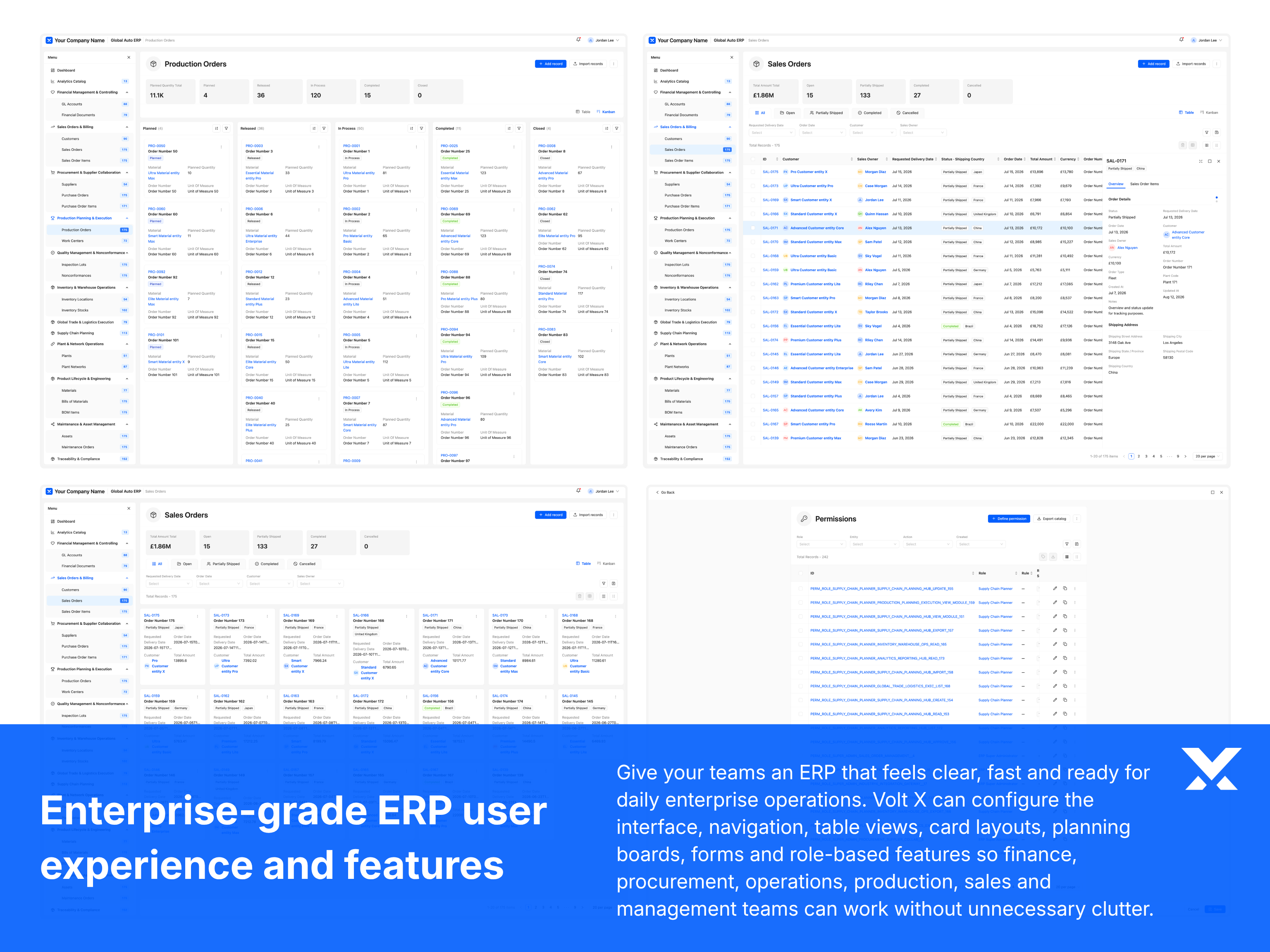
Volt X ERP kann um die Art und Weise konfiguriert werden, wie Ihre Teams jeden Tag arbeiten. Die Oberfläche, Navigation, Tabellenansichten, Karten-Layouts, Zusammenfassungspanels, Formulare, Dashboards und rollenbasierten Funktionen können alle um Ihre Benutzer herum gestaltet werden, damit das Produkt klar, schnell und bereit für echte Geschäftsarbeit wirkt.
Dies gibt Ihrer Organisation eine Enterprise-taugliche ERP-Erfahrung ohne unnötiges Durcheinander. Jedes Team bekommt die Ansichten, Aktionen und Workflows, die es braucht, während die Plattform konsistent, strukturiert und einfach zu bedienen über Funktionen hinweg bleibt.
VOLT X VORTEIL 5
Ein ERP sollte Teams eine klare Sicht auf jeden Lieferanten, jede Bestellung, Rechnung, Budgetzeile, jeden Bestandsartikel, Kundenauftrag oder Genehmigungsfall geben, nicht nur eine Datensatzliste. Finanz-, Beschaffungs-, Betriebs-, Audit- und Führungsteams müssen oft unterschiedliche Informationen über dieselbe Transaktion, denselben Lieferanten, Bestandsartikel oder dieselbe Geschäftsentität sehen.
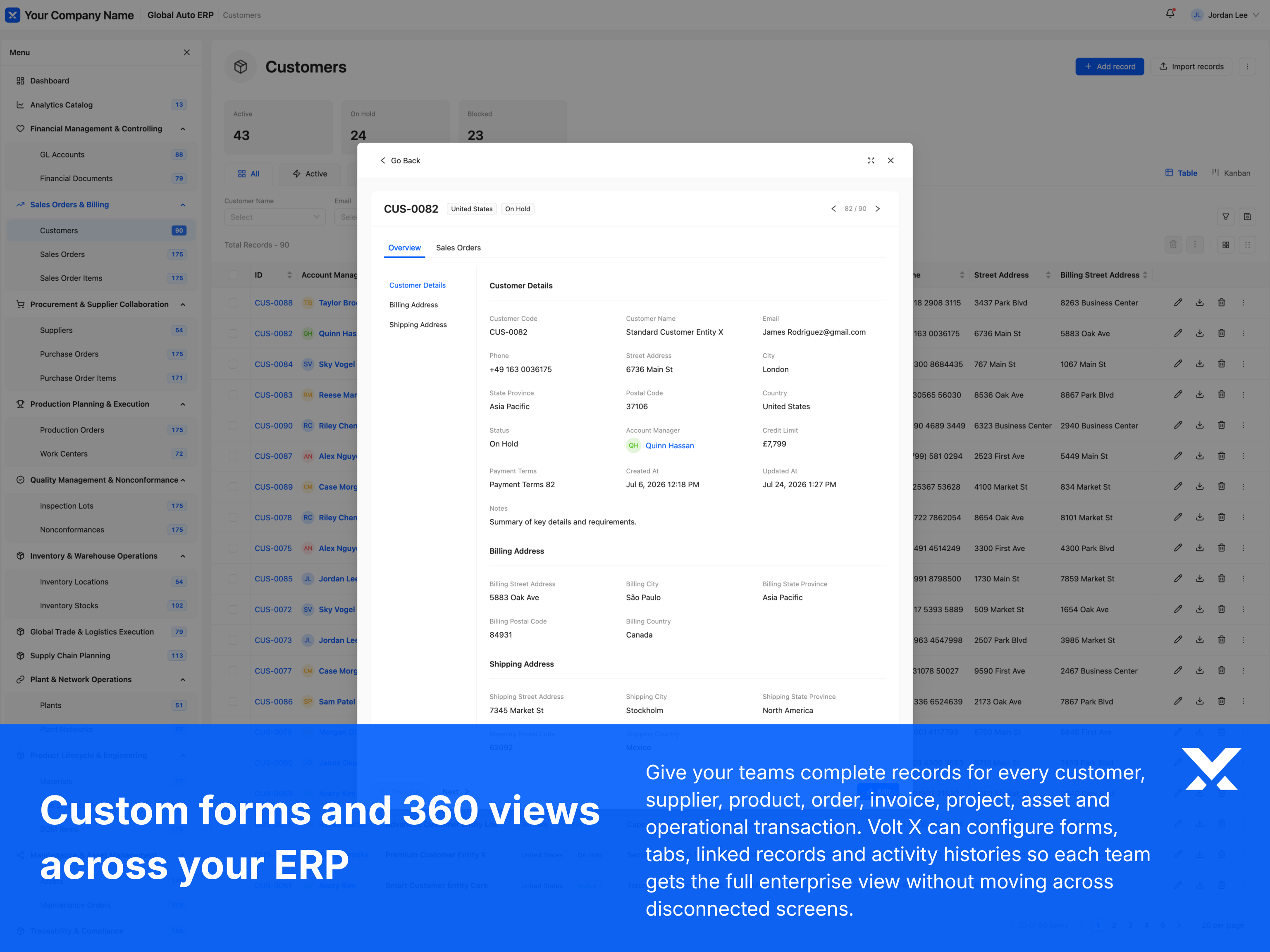
Volt X ERP kann mit individuellen Formularen und detaillierten 360-Ansichten konfiguriert werden, die die richtigen Betriebsinformationen in einen strukturierten Arbeitsbereich bringen. Sie können Felder, Abschnitte, Tabs, verknüpfte Datensätze, Aktivitätshistorie, Dokumente, Genehmigungen, Zahlungsstatus, Bestandsbewegungen, Eigentumsdetails und Audit-Trails um die Art und Weise anpassen, wie Ihre Organisation ERP-Entitäten verwaltet.
Dies gibt Ihren Teams eine vollständige Geschäftsentitätsansicht, ohne sie zu zwingen, über getrennte Bildschirme zu suchen. Jeder Datensatz kann die Informationen, Beziehungen, Aktionen und Historie zeigen, die nötig sind, um die Transaktion zu verstehen und die Arbeit voranzubringen.
VOLT X VORTEIL 6
ERP-Benutzer brauchen oft Zugriff abseits eines Schreibtischs. Manager müssen möglicherweise eine Bestellanforderung auf Reisen genehmigen. Finanzteams müssen möglicherweise den Zahlungsstatus prüfen. Betriebsteams müssen möglicherweise Bestands- oder Auftragsprobleme überprüfen. Die Führung braucht möglicherweise schnellen Zugriff auf Finanz- und Betriebsdashboards.
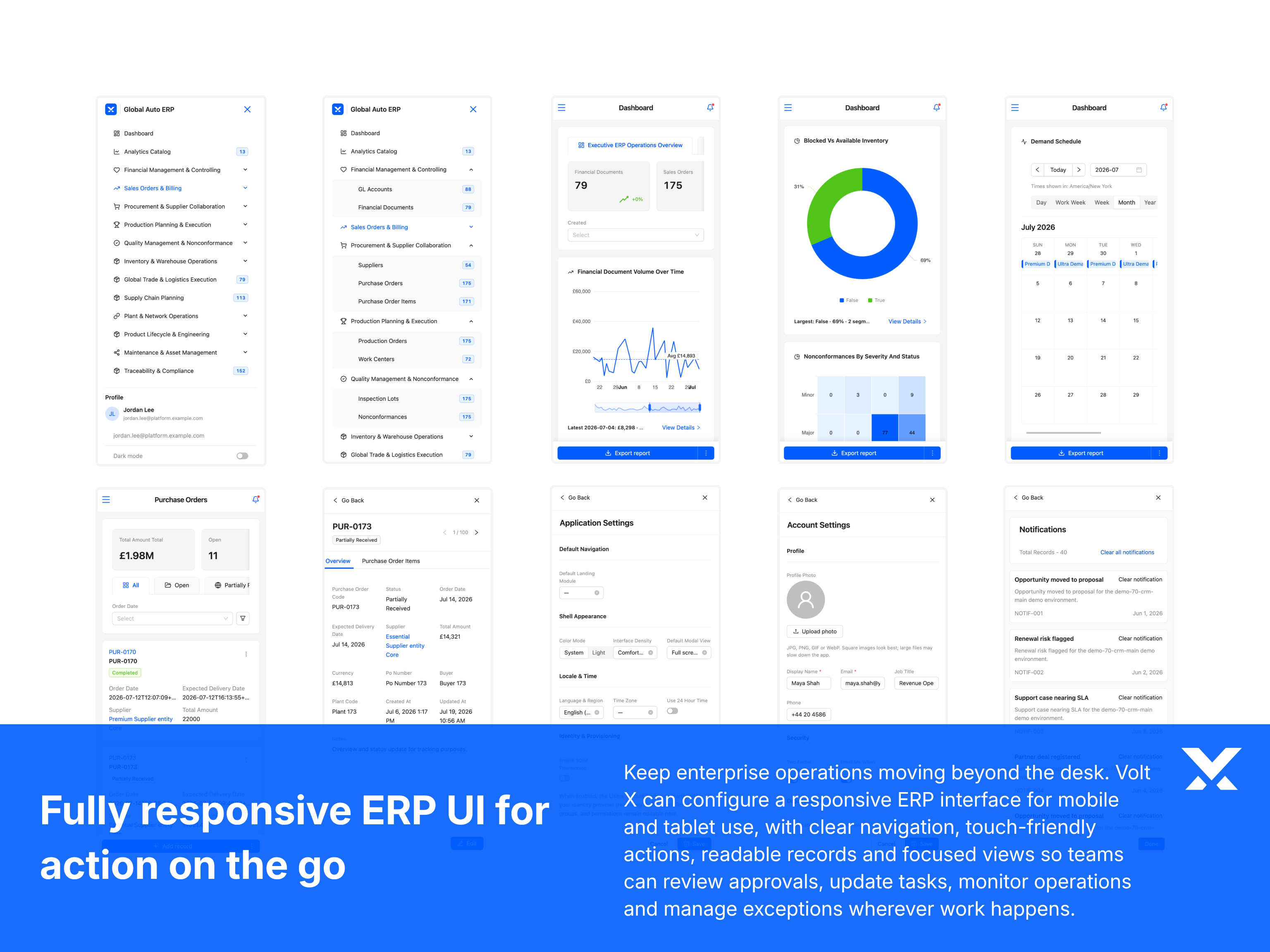
Jedes Volt X Produkt ist responsiv und kann mobile Ansichten unterstützen. Für ERP kann die mobile Erfahrung von voller Web-Parität bis zu einer fokussierten mobilen Version konfiguriert werden. Einige Rollen benötigen möglicherweise breiten ERP-Zugriff auf dem Mobilgerät. Andere benötigen möglicherweise nur Genehmigungen, Review-Bildschirme, Alerts, Dashboards und einfache Aktualisierungen.
Mobiles ERP sollte nicht einfach das Desktop-Produkt in einen kleineren Bildschirm gequetscht sein. Volt X kann die mobilen Ansichten Modul für Modul und Rolle für Rolle konfigurieren, damit jedes Team die richtigen Funktionen bekommt, wenn es abseits des Schreibtischs handeln muss.
VOLT X VORTEIL 7
Starke Unternehmenssoftware dreht sich nicht nur um Module und Workflows. Es geht auch darum, wie einfach sich das Produkt im täglichen Gebrauch anfühlt. Finanz-, Beschaffungs- und Betriebsteams arbeiten oft durch lange Review-Sitzungen, dichte Transaktionsbildschirme und schnelllebige Genehmigungswarteschlangen, daher sind Barrierefreiheit und Anzeigekomfort wichtig.
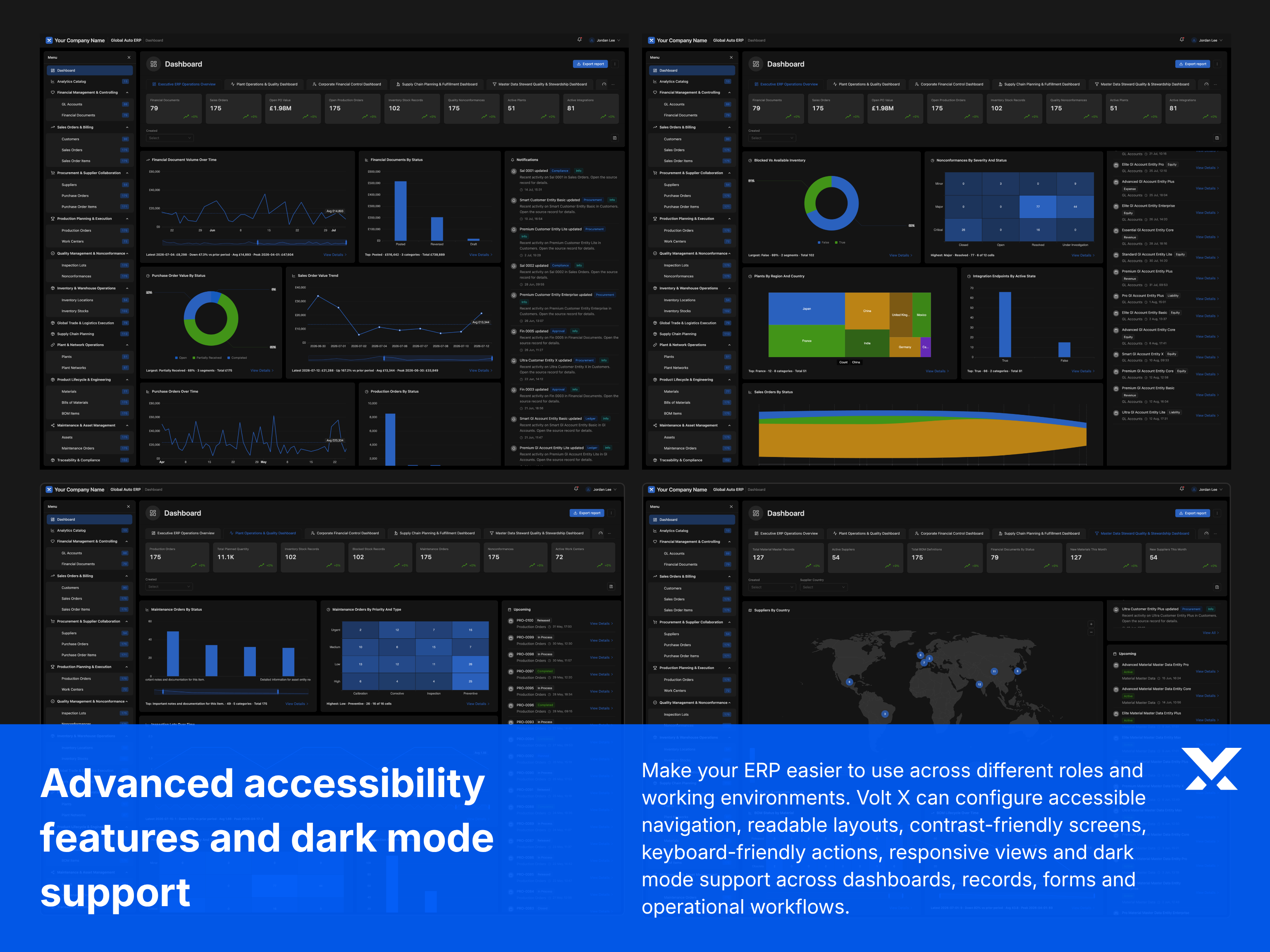
Every Volt X product system includes a consistent set of interface controls so teams can work in the layout that suits them. That includes list and card views, column management, hide-and-show stats cards, saved filtered views, keyboard navigation, readable states, responsive layouts, dark mode, and the other practical controls that make a product system feel mature from day one.
Diese Kontrollen sind Teil der gemeinsamen Volt X Produktgrundlage, keine optionalen Extras. Teams können einstellen, wie ERP-Daten angezeigt werden, visuelles Rauschen reduzieren, nützliche Ansichten speichern, Anzeigemodi wechseln und komfortabel arbeiten, während sie innerhalb geregelter Berechtigungen und Audit-Regeln bleiben.
Enterprise-Kontrollen
Ein hochwertiges ERP muss mehr tun als Finanzen und Betrieb verbinden. Es benötigt auch die Enterprise-Kontrollen, die das System zuverlässig machen: Benutzer, Rollen, Berechtigungen, Konfiguration, Prüfbarkeit, Integrationen, Sicherheit und operative Governance.
Diese Kontrollen sind an den ERP-Kontext angepasst, damit Ihre Teams Zugriff, Daten, Genehmigungen, Berichtswesen, Workflows und Integrationen verwalten können, ohne die tägliche Verwaltung zu einer technischen Abhängigkeit zu machen.
Volt-X-Delivery-Modell
Dies gibt jedem Projekt einen starken Ausgangspunkt über Workflows, Daten, Rollen, Berechtigungen, Oberflächen und Lieferlogik, bevor die Anpassung beginnt.
Dieses Modell bietet die Flexibilität von individueller Software, ohne das Projekt in eine unbegrenzte Entwicklung zu verwandeln. Ob wir von einer bekannten Produktkategorie oder einem neuen Geschäftsanwendungsfall ausgehen, Volt X erstellt zunächst eine strukturierte Enterprise-Grundlage und formt die Software dann um deine Workflows, Genehmigungen, Integrationen, Berichtsanforderungen, Markensystem und Betriebsmodell herum. Das Ergebnis ist Software, die sich maßgeschneidert für dein Unternehmen anfühlt, aber mit der Struktur, Konsistenz und Qualitätskontrolle eines ausgereiften Produktsystems gebaut ist.
Keine Lizenzfalle
Lizenzierte Standardsoftware zwingt Sie, Arbeitsplätze zu mieten, Anbieter-Roadmaps zu akzeptieren und Jahr für Jahr erneut für Funktionen zu bezahlen, die Sie nie wirklich kontrollieren. Volt X lizenziert keine Produkte. Wir liefern vollständig individualisierte Enterprise-Software, die in Ihrer Umgebung betrieben wird — als Ihr eigenes Asset.
Dieses Eigentum verändert, was möglich ist: Sie bestimmen die Roadmap, kontrollieren die Datengrenze, erweitern das Produkt ohne Genehmigung und können — wo Ihre Strategie es erlaubt — die Lösung produktisieren oder an einen größeren Markt weiterverkaufen. Keine dauerhafte Abonnementfalle. Kein Anbieter, der die Schlüssel hält.
Ihre Cloud, Ihre Datenresidenzregeln, Ihre Sicherheitsgrenze. Das Produkt läuft dort, wo Ihr Governance-Modell es verlangt — nicht auf einem Multi-Tenant-System eines Anbieters, das Sie nicht kontrollieren.
Nach der Übergabe gehört Ihnen das individualisierte Produkt. Es ist Ihr Software-Asset — kein Abonnement-Login, keine gemietete Instanz und keine Lizenz, die bei schwierigen Verhandlungen verfällt.
Volt X verkauft keine Arbeitsplatzlizenzen und keine Standardabonnements. Sie investieren in Software, die auf Ihr Unternehmen zugeschnitten und einmalig in Ihrer Umgebung bereitgestellt wird — ohne endlose Mietrechnung für dieselbe Leistung.
Wo Ihre Strategie es vorsieht, können Sie die Lösung produktisieren, als White-Label anbieten oder einem breiteren Markt zugänglich machen. Lizenziertes SaaS untersagt dies. Eigene Software nicht.
Sie sind nicht abhängig vom Release-Kalender anderer, von Preiserhöhungen, Funktionsstreichungen oder End-of-Life-Ankündigungen. Ihr Team kann eigenständig betreiben, erweitern und integrieren.
Jedes Volt X Produkt ist in sich vollständig und wird dann an Ihre Arbeitsabläufe, Rollen, Freigabeprozesse, Integrationen und Marke angepasst — so passt das, was Sie besitzen, bereits zu Ihrer Arbeitsweise.
Angrenzende Produkte
Kombinieren Sie ERP mit anderen Volt X Grundlagen, damit Finanz-, Bestands-, Kundenbetriebs- und Workforce-Systeme auf einem Lineage ausgerichtet bleiben.
Gespräch beginnen
Wir freuen uns, von Ihnen zu hören.
Was als Nächstes geschieht
Bevorzugen Sie E-Mail? business@yourvoltx.com
Produktsystem-Highlights
Ein strukturierter Überblick über die Enterprise Resource Planning-Grundlage, Modulbreite, Datenmodelltiefe, operative Abdeckung und die Produktsystem-Elemente, die eine ernsthafte Enterprise-Bereitstellung unterstützen.
Geschäftsmodule
Strukturierte Module, die die Kern-Workflows, Entitäten und operativen Bereiche abdecken, die von einer ausgereiften Produktsystem-Grundlage erwartet werden.
Attribute insgesamt
Datenfelder, Eigenschaften und Konfigurationspunkte, die modulübergreifend abgebildet sind, damit das Produktsystem an Ihr Geschäftsmodell angepasst werden kann.
Operationen und Aktionen
Definierte Operationen, Übergänge und Benutzeraktionen, die die tägliche Ausführung über Teams, Rollen und Workflows hinweg unterstützen.
Zusätzliche Mehrwerte
Zusätzliche Fähigkeiten, Beschleuniger und Produktsystem-Erweiterungen, die Benutzerfreundlichkeit, Kontrolle und Bereitstellung über die Basismodule hinaus stärken.
Konfigurierbare Workflows
Workflow-Muster, Genehmigungspfade und Prozessstrukturen, die angepasst werden können, ohne die zugrunde liegende Produktgrundlage neu aufzubauen.
Integrationspunkte
Verbindungspunkte für Datenaustausch, APIs, Events und Drittsysteme, damit das Produktsystem in Ihre übrigen Unternehmensanwendungen passt.
Wertnachweis
Volt X ERP ist darauf ausgelegt, die operative Leistung Ihres Unternehmens zu verbessern, indem es Finanzsichtbarkeit, Beschaffungsdisziplin, Bestandskontrolle, Workflow-Verantwortlichkeit, Berichtsqualität und funktionsübergreifende Entscheidungsfindung stärkt.
Wenn es um Ihr Betriebsmodell zugeschnitten und von Ihren Teams ordnungsgemäß übernommen wird, kann Volt X ERP messbare Fortschritte bei Produktivität, Kostenkontrolle, Governance und Managementsichtbarkeit liefern.
Potenzieller Return für jeden investierten $1
Volt X ERP ist darauf ausgelegt, die Investition zu rechtfertigen, indem es Finanzen, Beschaffung, Inventar, Genehmigungen, Berichtswesen und operative Workflows in ein geregeltes System verbindet. Wenn es um Ihre Organisation zugeschnitten ist, kann das System potenziell etwa $7 für jeden investierten Dollar zurückgeben.
Potenzielle wöchentliche Zeitersparnis im Finanzbereich
Volt X ERP hilft Finanz- und Buchhaltungsteams, manuelle Konsolidierung, Tabellenabstimmung, doppelte Eingaben, Berichtsvorbereitung und Genehmigungsnachverfolgung zu reduzieren. Mit der richtigen Implementierung können Finanzbenutzer potenziell etwa 14,5 Stunden pro Woche einsparen.
Potenzielle wöchentliche Zeitersparnis in der Lieferkette
Volt X ERP gibt Supply-Chain-, Logistik- und Bestandsteams saubereren Zugriff auf Bestände, Bestellungen, Beschaffung, Fulfillment und operative Daten. Mit den richtigen Workflows können diese Teams potenziell etwa 8,7 Stunden pro Woche einsparen.
Potenzieller Drei-Jahres-ROI
Volt X ERP ist darauf ausgelegt, Wert durch vereinheitlichte Daten, optimierte Prozesse, besseres Berichtswesen, reduzierten manuellen Aufwand, geringere operative Reibung und stärkere Managementkontrolle zu schaffen. Mit ordnungsgemäßer Adoption kann das System potenziell einen Drei-Jahres-ROI im Bereich von 100% und mehr unterstützen.