
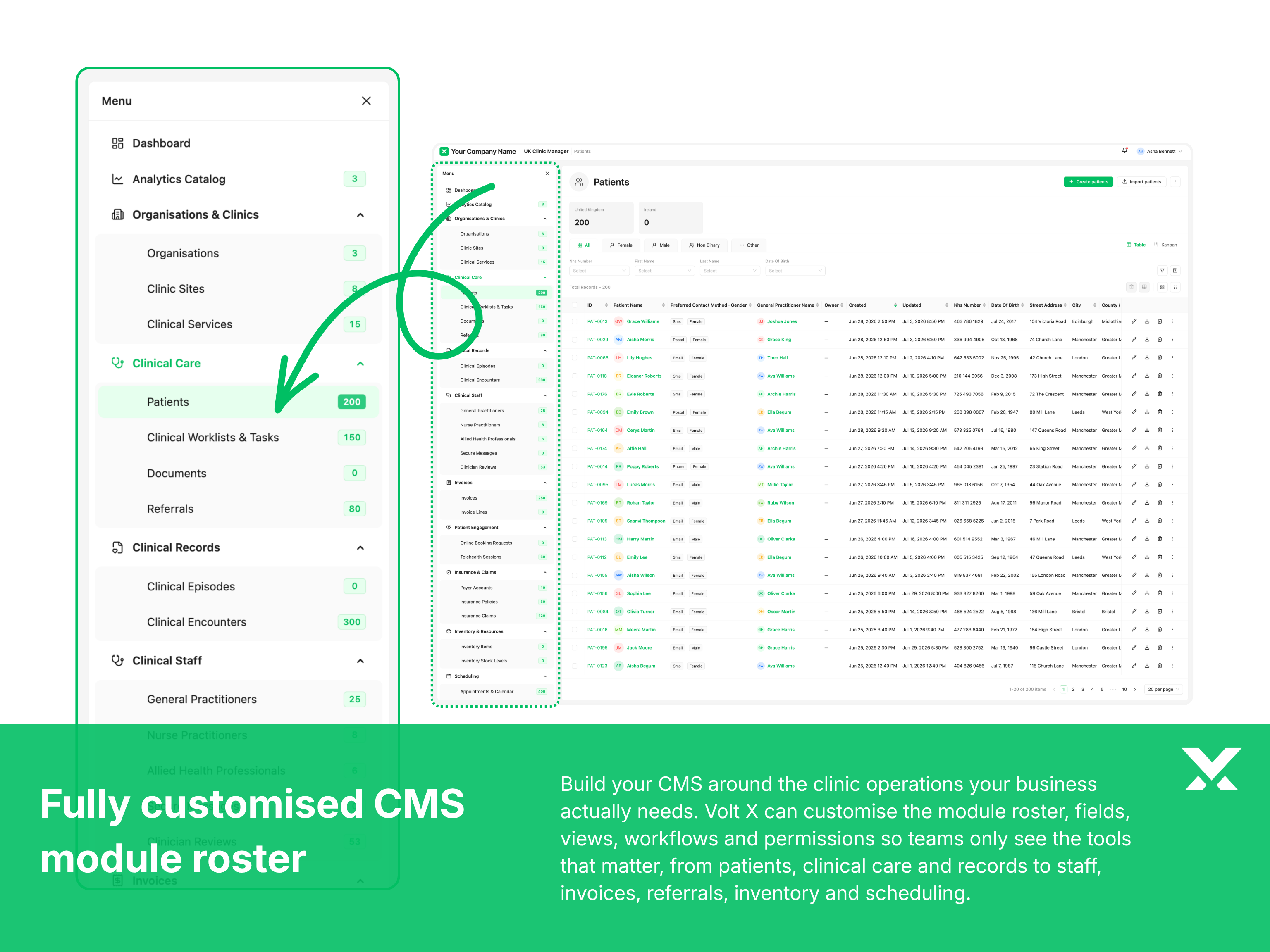
Rollenspezifische Arbeitsbereiche
Geben Sie Empfangs-, klinischen, operativen und Führungsteams Dashboards, die um ihre täglichen Entscheidungen und Verantwortlichkeiten herum aufgebaut sind.
Diese Seite wurde mit KI übersetzt und kann Ungenauigkeiten enthalten.
Klinik-Management-System
Diese Klinik-Management-Plattform koordiniert Patientenregistrierung, Terminplanung über mehrere Behandler und klinische Workflows für Krankenhäuser und Kliniknetzwerke. Sie ist auf strikte regulatorische Compliance ausgelegt: Patientendaten werden im Ruhezustand und bei der Übertragung verschlüsselt, und die HL7-Integration verbindet das System zuverlässig mit Laborsystemen und DICOM-Bildbetrachtern. Konsultationswarteschlangen und Verschreibungs-Workflows verkürzen Wartezeiten und Verwaltungsaufwand, auf einer vollständig auditierbaren Plattform, die dezentralisierten Kliniknetzwerken den sicheren Umgang mit sensiblen Daten und eine kontinuierliche Versorgung ermöglicht. Im Vergleich zu typischen Enterprise-Lizenzen pro Nutzer liegt der Einstieg so, dass sich die Anfangsinvestition schnell amortisieren kann und danach dauerhaft Einsparungen gegenüber laufenden Abogebühren entstehen. Weil Volt X jedes Produkt an Ihre Arbeitsweise anpasst, können Effizienz- und Performance-Gewinne im Alltag diese Amortisation weiter vorziehen und den Return on Investment früher sichtbar machen.
Ein Klinikmanagement-System ist nicht einfach ein Terminbuch. Es ist die Betriebsschicht, die Patientenregistrierung, klinische Arbeit, Anbieterverfügbarkeit, Akten, administrative Übergaben, Reporting und die vielen Entscheidungen verbindet, die nötig sind, um eine Klinik effektiv zu betreiben. Volt X CMS bringt Registrierung, Termine, klinische Pfade, Anbieterpläne, Aktenzugriff, Abrechnungsinputs, Patientenkommunikation und Klinikanalysen in eine geregelte Produktgrundlage. Jeder Teil kann um das Praxismodell, die Verantwortlichkeiten und Workflows der Organisation herum konfiguriert werden.
Volt X Vorteile
Reife Fähigkeiten für Patienten, Termine, klinische Workflows, Anbieterpläne, Aktenzugriff, Abrechnungsinputs, Reporting und tägliche Klinikverwaltung.
Volt X CMS ist nicht auf ein generisches Klinik-Softwaremodell festgelegt. Es kann um Fachrichtungen, Standorte, Rollen, Governance-Anforderungen, klinische Pfade und bestehende Systeme herum gestaltet werden.
VOLT X VORTEIL 1
Empfangsteams benötigen sofortige Sichtbarkeit von Ankünften, wartenden Patienten, Planänderungen und Registrierungsproblemen. Klinische Teams benötigen Zugriff auf ihre Termine, Aufgaben, Prüfungen und Nachverfolgungen. Praxismanager und Führungsteams benötigen eine breitere Sicht auf Kapazität, Auslastung, Workflow-Leistung und operative Ausnahmen.
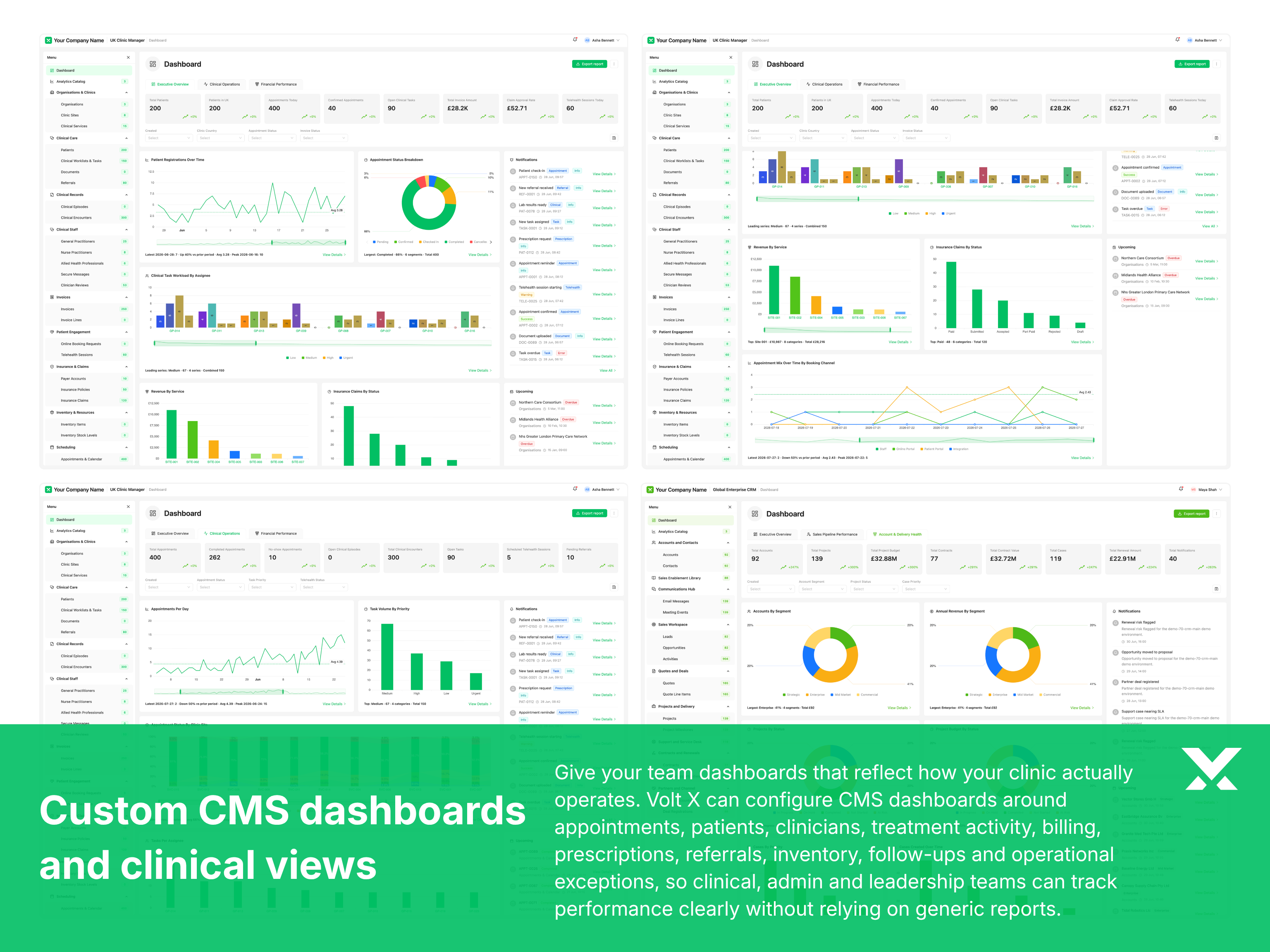
Volt X CMS kann rollenspezifische Dashboards mit denselben geregelten Klinikdaten bereitstellen. Widgets, Metriken, Warteschlangen, Alerts und Aktionen können für jede Rolle, Abteilung, Standort oder Fachrichtung konfiguriert werden, ohne getrennte Versionen operativer Informationen zu erstellen.
Jedes Team beginnt mit den Informationen, die für seine Verantwortlichkeiten relevant sind, und hilft dem Personal, Prioritäten zu erkennen, auf Ausnahmen zu reagieren und den Patientenfluss während des Arbeitstages zu koordinieren.
VOLT X VORTEIL 2
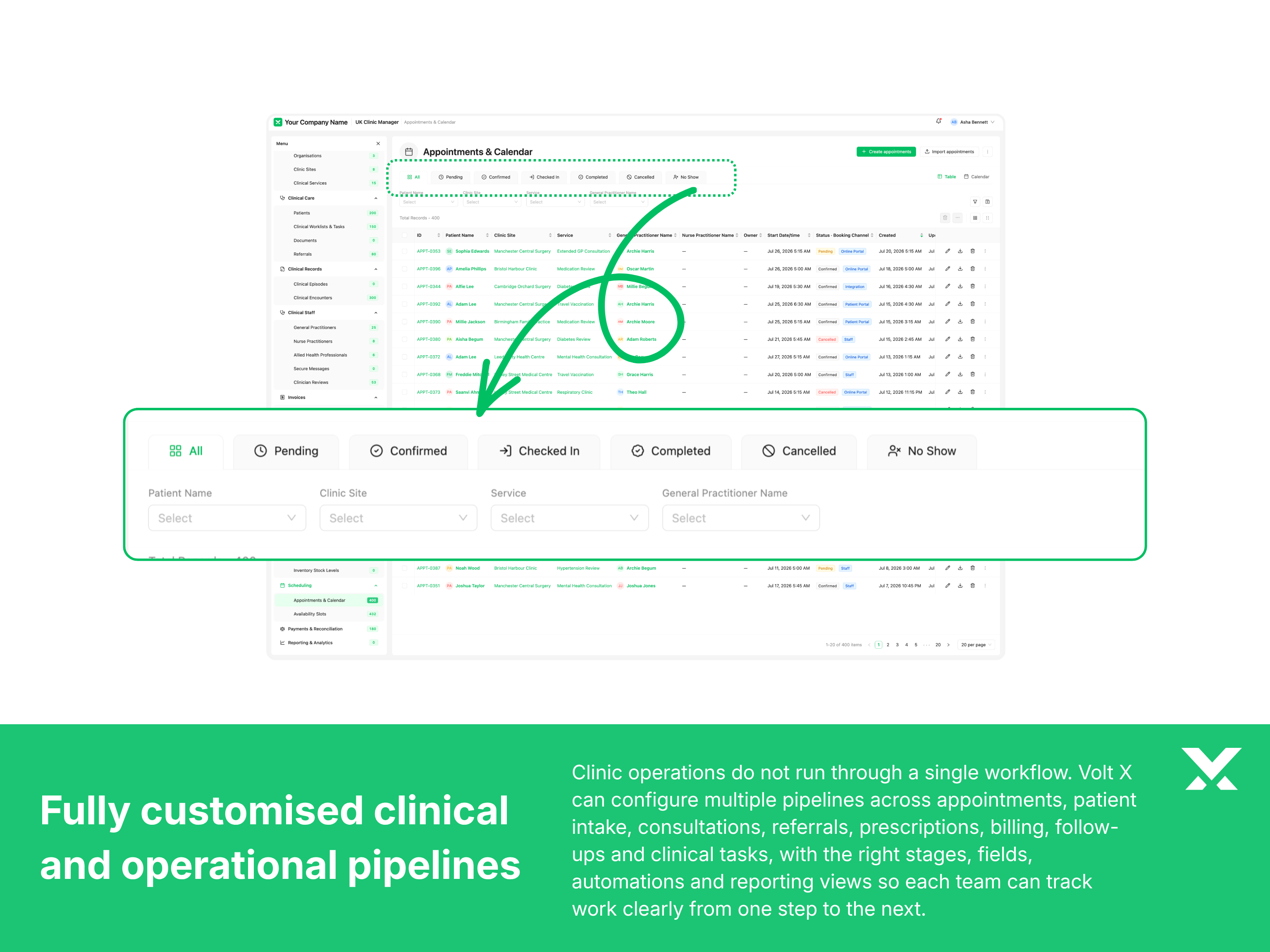
Patientenverwaltung, Terminplanung und klinische Aktivität können nicht als separate Systeme betrieben werden. Klinikteams benötigen eine durchgehende Sicht auf die Patientenreise, von der Registrierung und Buchung über die Konsultation, Nachverfolgung, Überweisung bis zur administrativen Fertigstellung.
Volt X CMS verbindet Patientenakten, Terminereignisse, Anbieterpläne, klinische Workflow-Stufen und zugehörige Aktionen über ein gemeinsames Betriebsmodell. Felder, Status, Formulare und Workflow-Regeln können um die Fachrichtungen und Servicepfade der Praxis herum konfiguriert werden.
Eine verbundene Patienten- und Termingrundlage reduziert fragmentierte Arbeit, verbessert die Sichtbarkeit über Teams hinweg und hilft jedem autorisierten Benutzer zu verstehen, was passiert ist, was erforderlich ist und wer verantwortlich ist.
VOLT X VORTEIL 3
Viele Kliniken benötigen mehr als Patientenregistrierung und Terminverwaltung. Überweisungen, Laboranfragen, Dokumente, Inventar, Telemedizin, Abrechnungsvorbereitung, Behandlungsprogramme und Kommunikation werden oft zu separaten Prozessen, die durch Tabellen, Posteingänge oder getrennte Tools unterstützt werden.
Volt X kann das CMS mit zusätzlichen Modulen erweitern, die auf das Servicemodell der Klinik abgestimmt sind. Jede Erweiterung kann dieselben Patienten, Benutzer, Berechtigungen, Workflows und Reporting-Strukturen nutzen, anstatt eine weitere isolierte Anwendung zu erstellen.
Die Klinik kann neue Fähigkeiten einführen, wenn die operativen Anforderungen wachsen, während sie eine konsistente Produkterfahrung, ein gemeinsames Datenmodell und eine kontrollierte Integrationsarchitektur beibehält.
VOLT X VORTEIL 4
Klinische Akten, Patientendetails, Finanzinformationen, Zeitpläne und Betriebseinstellungen sollten nicht für jeden Benutzer gleichermaßen zugänglich sein. Kliniken benötigen Berechtigungen, die professionelle Verantwortlichkeiten, Abteilungen, Standorte, Beschäftigungsverhältnisse und externe Arbeitsbeziehungen widerspiegeln.
Volt X CMS kann rollenbasierte Zugriffskontrollen über Module, Datensätze, Felder, Aktionen und administrative Einstellungen hinweg implementieren. Berechtigungen können zwischen klinischen, Empfangs-, operativen, Finanz-, Management- und externen Partnerverantwortlichkeiten unterscheiden, mit zusätzlichen Kontrollen für sensible Workflows wo nötig.
Benutzer erhalten den Zugriff, den sie für ihre Rolle benötigen, während die Organisation eine klarere Trennung zwischen klinischer Arbeit, Verwaltung, Finanzen, Konfiguration und Aufsicht aufrechterhält.
VOLT X VORTEIL 5
Der Klinikbetrieb hängt von rechtzeitigem Handeln über mehrere Teams hinweg ab. Terminerinnerungen, Nachverfolgungsaufgaben, Ergebnisprüfungen, Überweisungs-Updates, Genehmigungsanfragen und Patientenkommunikation können leicht verzögert werden, wenn sie auf Erinnerung, informellen Nachrichten oder manueller Nachverfolgung beruhen.
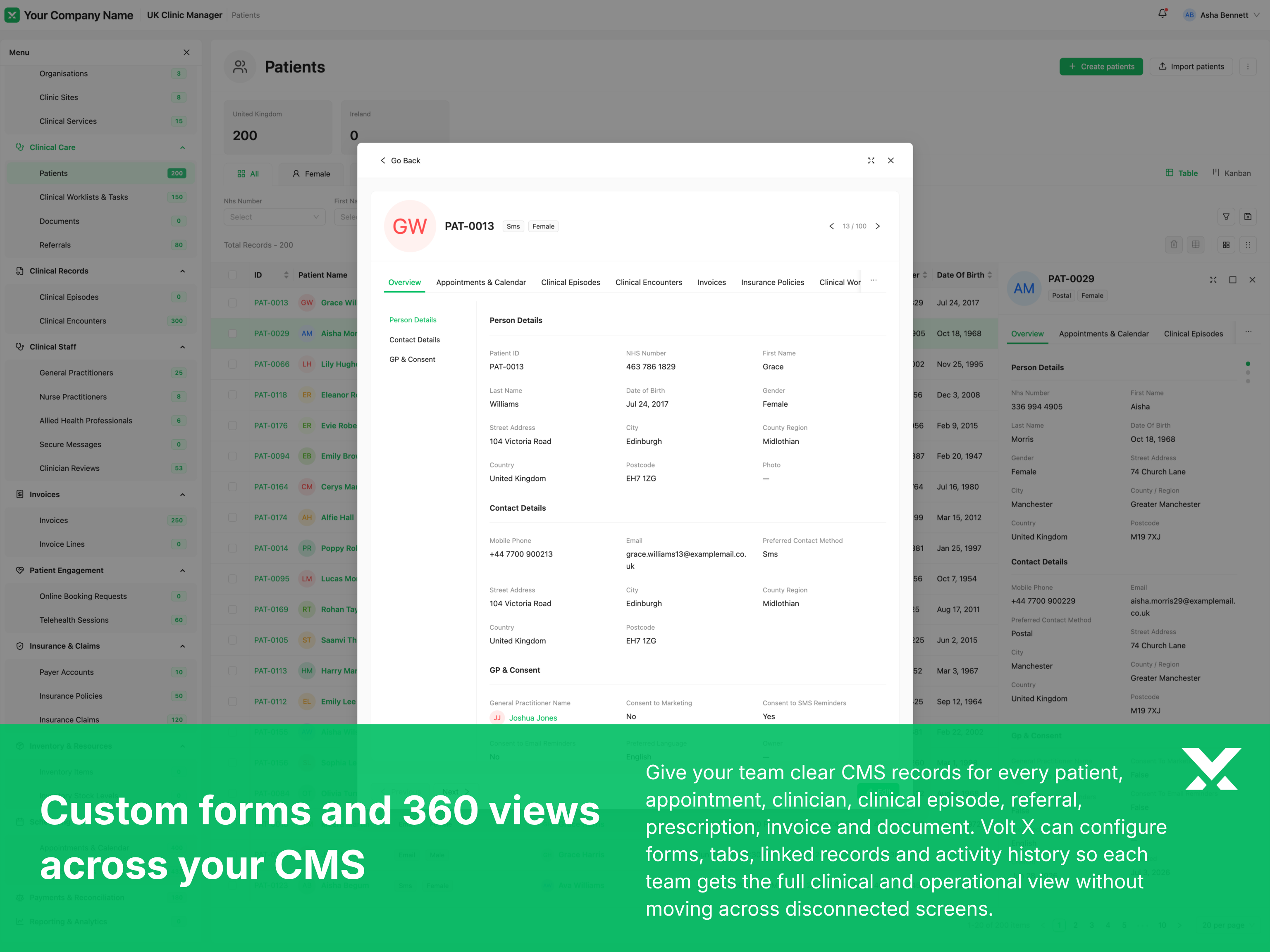
Volt X CMS kann Benachrichtigungen und Arbeitswarteschlangen basierend auf Terminereignissen, Workflow-Stufen, zugewiesenen Verantwortlichkeiten, Fristen und Ausnahmen generieren. Zustellmethoden, Eskalationsregeln, Vorlagen und Empfängergruppen können um das Kommunikationsmodell der Klinik herum konfiguriert werden.
Strukturierte Alerts helfen den richtigen Personen, zur richtigen Zeit zu handeln, ohne Benutzer mit wahllosen Benachrichtigungen zu überfluten oder sich darauf zu verlassen, dass einzelne Mitarbeiter jeden Prozess manuell überwachen.
VOLT X VORTEIL 6
Kliniker, Praxismanager und Verwaltungsteams arbeiten nicht immer von einem festen Schreibtisch aus. Sie bewegen sich möglicherweise zwischen Sprechzimmern, Klinikstandorten, Empfangsbereichen und operativen Besprechungen, während sie dennoch rechtzeitigen Zugriff auf Zeitpläne, Aufgaben und autorisierte Patienteninformationen benötigen.
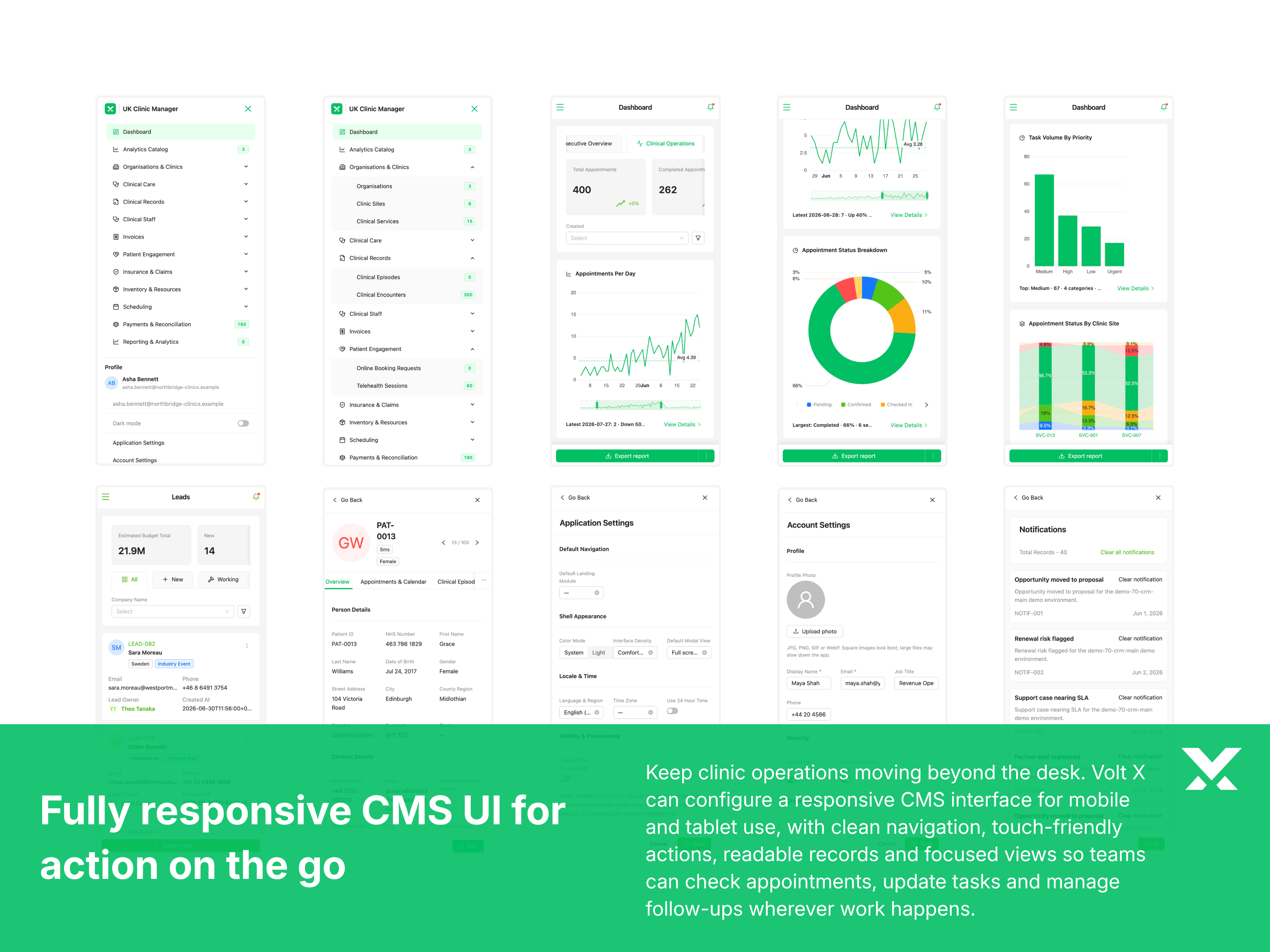
Volt X CMS verwendet responsive Interfaces, die sich über Desktop-, Tablet- und mobile Bildschirmgrößen anpassen. Mobile Ansichten, Aktionen und Informationsdichte können um die Aufgaben herum priorisiert werden, die Benutzer voraussichtlich abseits ihres primären Arbeitsplatzes erledigen.
Responsiver Zugriff hilft dem Personal, Zeitpläne zu überprüfen, Workflow-Aktionen zu aktualisieren, operative Informationen zu prüfen und auf Klinikprioritäten zu reagieren, ohne dass jede Aufgabe von einer Desktop-Oberfläche aus erledigt werden muss.
VOLT X VORTEIL 7
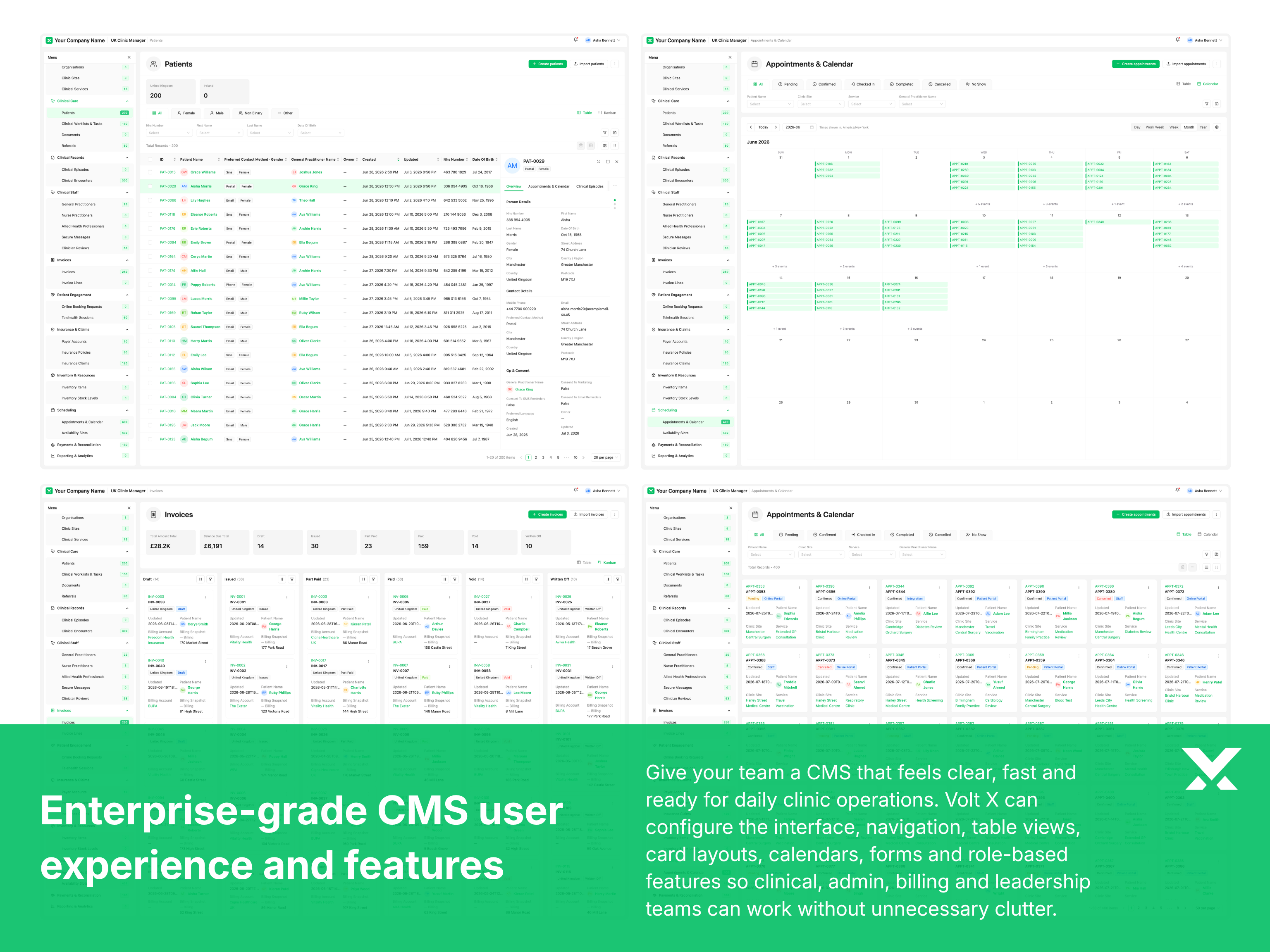
Klinikteams arbeiten mit großen Mengen an Terminen, Patientenakten, Aufgaben, Überweisungen und operativen Informationen. Sie brauchen Interfaces, die in geschäftigen Zeiten klar bleiben und es Benutzern ermöglichen, zwischen verschiedenen Arbeitstypen zu wechseln, ohne den Kontext zu verlieren.
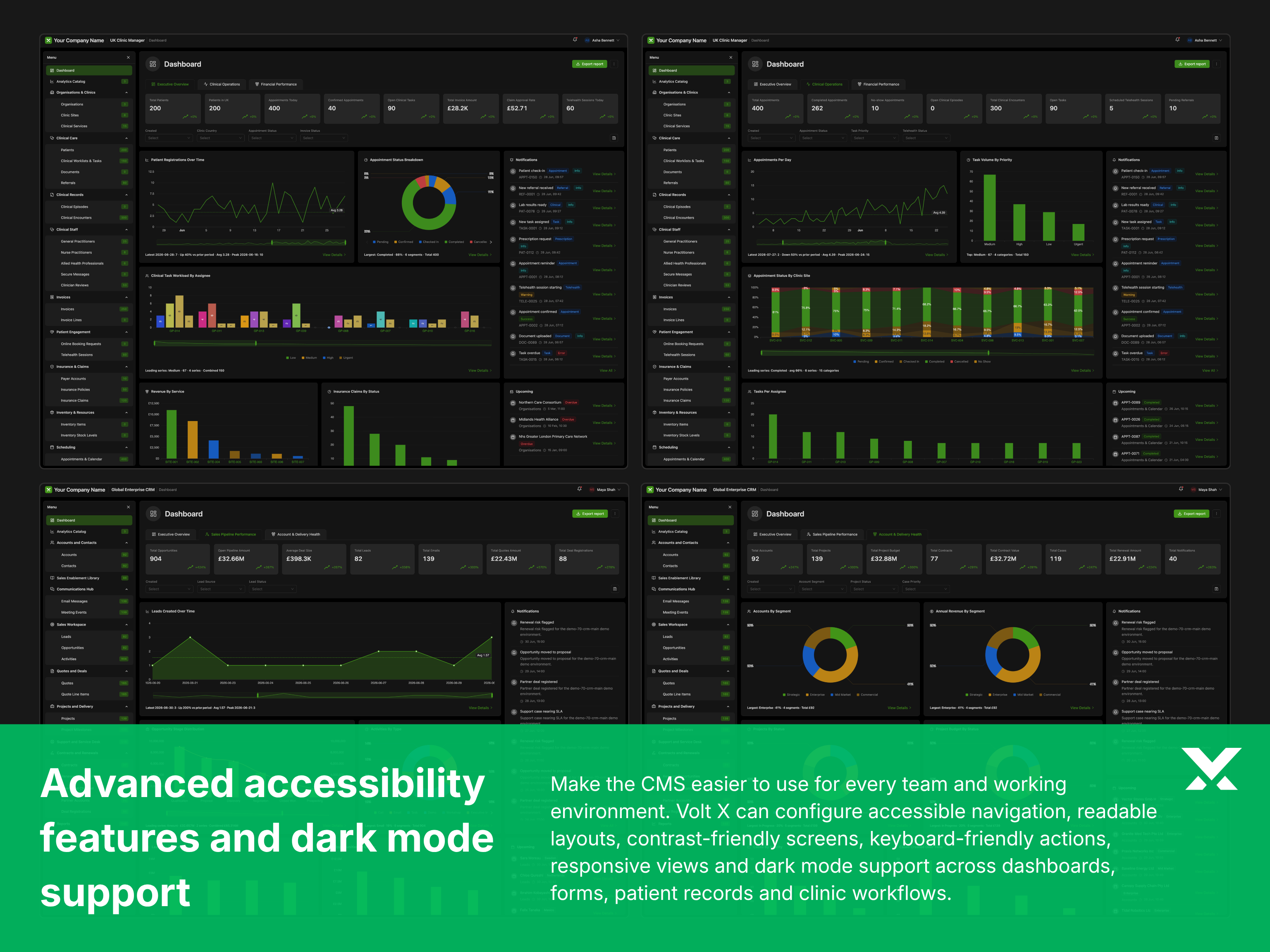
Volt X CMS includes reusable usability capabilities such as list and card views, advanced filters, saved views, search, quick actions, dark mode, accessible controls and configurable information density. These features can be adapted to the working patterns of each clinic team.
Konsistente Interaktionsmuster reduzieren unnötigen Aufwand, erleichtern wiederkehrende Aufgaben und helfen dem Personal, Klinikinformationen nach eigenen Verantwortlichkeiten und Prioritäten zu verwalten.
Enterprise-Kontrollen
Benutzerverwaltung, Berechtigungen, Prüfbarkeit, Konfiguration und Integrationen bieten die operative Grundlage, die für zuverlässige Klinik-Software benötigt wird.
Jede Kontrolle kann an die Standorte, Fachrichtungen, Abteilungen, Personalstruktur, das Governance-Modell und die bestehenden Systeme der Klinik angepasst werden.
Volt-X-Delivery-Modell
Dies gibt jedem Projekt einen starken Ausgangspunkt über Workflows, Daten, Rollen, Berechtigungen, Oberflächen und Lieferlogik, bevor die Anpassung beginnt.
Dieses Modell bietet die Flexibilität von individueller Software, ohne das Projekt in eine unbegrenzte Entwicklung zu verwandeln. Ob wir von einer bekannten Produktkategorie oder einem neuen Geschäftsanwendungsfall ausgehen, Volt X erstellt zunächst eine strukturierte Enterprise-Grundlage und formt die Software dann um deine Workflows, Genehmigungen, Integrationen, Berichtsanforderungen, Markensystem und Betriebsmodell herum. Das Ergebnis ist Software, die sich maßgeschneidert für dein Unternehmen anfühlt, aber mit der Struktur, Konsistenz und Qualitätskontrolle eines ausgereiften Produktsystems gebaut ist.
Keine Lizenzfalle
Lizenzierte Standardsoftware zwingt Sie, Arbeitsplätze zu mieten, Anbieter-Roadmaps zu akzeptieren und Jahr für Jahr erneut für Funktionen zu bezahlen, die Sie nie wirklich kontrollieren. Volt X lizenziert keine Produkte. Wir liefern vollständig individualisierte Enterprise-Software, die in Ihrer Umgebung betrieben wird — als Ihr eigenes Asset.
Dieses Eigentum verändert, was möglich ist: Sie bestimmen die Roadmap, kontrollieren die Datengrenze, erweitern das Produkt ohne Genehmigung und können — wo Ihre Strategie es erlaubt — die Lösung produktisieren oder an einen größeren Markt weiterverkaufen. Keine dauerhafte Abonnementfalle. Kein Anbieter, der die Schlüssel hält.
Ihre Cloud, Ihre Datenresidenzregeln, Ihre Sicherheitsgrenze. Das Produkt läuft dort, wo Ihr Governance-Modell es verlangt — nicht auf einem Multi-Tenant-System eines Anbieters, das Sie nicht kontrollieren.
Nach der Übergabe gehört Ihnen das individualisierte Produkt. Es ist Ihr Software-Asset — kein Abonnement-Login, keine gemietete Instanz und keine Lizenz, die bei schwierigen Verhandlungen verfällt.
Volt X verkauft keine Arbeitsplatzlizenzen und keine Standardabonnements. Sie investieren in Software, die auf Ihr Unternehmen zugeschnitten und einmalig in Ihrer Umgebung bereitgestellt wird — ohne endlose Mietrechnung für dieselbe Leistung.
Wo Ihre Strategie es vorsieht, können Sie die Lösung produktisieren, als White-Label anbieten oder einem breiteren Markt zugänglich machen. Lizenziertes SaaS untersagt dies. Eigene Software nicht.
Sie sind nicht abhängig vom Release-Kalender anderer, von Preiserhöhungen, Funktionsstreichungen oder End-of-Life-Ankündigungen. Ihr Team kann eigenständig betreiben, erweitern und integrieren.
Jedes Volt X Produkt ist in sich vollständig und wird dann an Ihre Arbeitsabläufe, Rollen, Freigabeprozesse, Integrationen und Marke angepasst — so passt das, was Sie besitzen, bereits zu Ihrer Arbeitsweise.
Angrenzende Produkte
Verbinden Sie Volt X CMS mit CRM-, HRMS-, BMS-, ERP- und BIS-Fähigkeiten, um Patientenengagement, Workforce-Operations, Einrichtungen, Finanzen und organisationsweites Reporting zu unterstützen.
Gespräch beginnen
Wir freuen uns, von Ihnen zu hören.
Was als Nächstes geschieht
Bevorzugen Sie E-Mail? business@yourvoltx.com
Produktsystem-Highlights
Volt X CMS kombiniert breite Klinikfunktionalität mit konfigurierbaren Datenstrukturen, Workflows, Berechtigungen, Interfaces und Integrationspunkten für multidisziplinäre Gesundheitsoperationen.
Klinik-ausgerichtete Module
Starten Sie mit einem breiten Set verbundener Module, die Patienten, Termine, Anbieter, klinische Workflows, Überweisungen, Dokumente, Kommunikation, Abrechnungsinputs und Reporting abdecken. Volt X kann diese Module um das spezifische Betriebsmodell der Klinik herum auswählen, erweitern oder umstrukturieren.
Klinische und administrative Felder
Konfigurieren Sie Patienten-, Termin-, Anbieter-, Überweisungs-, klinische und operative Informationen, ohne auf starre generische Datensätze angewiesen zu sein. Felder, Formulare, Validierungsregeln und Datenbeziehungen können an jede Fachrichtung, Abteilung, Standort oder Servicelinie angepasst werden.
Rollenspezifische Aktionen
Unterstützen Sie die tägliche Arbeit von Empfangsteams, Klinikern, Pflegepersonal, Administratoren, Abrechnungsteams und operativen Leitern durch klar zugewiesene Aktionen. Jede Rolle kann die für ihre Verantwortlichkeiten relevanten Werkzeuge, Informationen und Entscheidungen erhalten.
Interface- und Navigationskontrollen
Verbessern Sie den alltäglichen Gebrauch durch Listen- und Kartenansichten, Filter, gespeicherte Suchen, Statusindikatoren, Schnellaktionen, Dashboards, responsive Layouts und Barrierefreiheitsfunktionen. Diese Fähigkeiten helfen Benutzern, große Mengen klinischer Informationen ohne unnötige Navigation zu bearbeiten.
Klinische und administrative Workflows
Konfigurieren Sie Prozesse für Registrierung, Terminvorbereitung, Überweisungen, Nachverfolgungen, klinische Prüfungen, Genehmigungen, Ergebnisverwaltung und Abrechnungsübergaben. Workflow-Stufen, Verantwortlichkeiten, Regeln und Ausnahmen können um lokale Klinikverfahren herum gestaltet werden.
Systemintegrationspunkte
Verbinden Sie das CMS mit Patientenportalen, Laborsystemen, Bildgebungsdiensten, Finanzplattformen, CRM-Tools, Kommunikationsanbietern und Reporting-Umgebungen. Integrationsprioritäten können um die bestehenden Systeme und das Daten-Governance-Modell der Klinik herum definiert werden.
Wertnachweis
Bessere Patientenregistrierung, Terminauslastung, klinische Koordination und administrative Effizienz durch ein auf die Organisation zugeschnittenes Kliniksystem.
Ergebnisse hängen von Konfiguration, Adoption, operativer Disziplin und der Qualität der zugrunde liegenden Klinikprozesse ab.
Potenziell zurückgewonnene Verwaltungszeit
Verbundene Registrierungs-, Termin-, Anbieter- und Patienten-Workflows können wiederholte Dateneingabe, manuelle Statusprüfung und vermeidbare Koordination reduzieren. Bei effektiver Konfiguration und Adoption kann Volt X CMS potenziell bis zu 25% der ausgewählten Empfangs- und Verwaltungskapazität zurückgewinnen.
Potenzielle Auslastungsverbesserung
Bessere Planungsregeln, Wartelistenverwaltung, Erinnerungen, Anbietersichtbarkeit und Stornierungshandling können Kliniken helfen, verfügbare Terminkapazität effektiver zu nutzen. Abhängig von der operativen Baseline kann Volt X CMS die Auslastung potenziell verbessern oder vermeidbare Nichterscheinungen um bis zu 15% reduzieren.
Potenziell schnellere Registrierung
Konfigurierbare Registrierungsformulare, Vorab-Informationserfassung, Validierungsregeln und wiederverwendbare Patientendaten können den Aufwand reduzieren, der nötig ist, um Patienten auf Termine vorzubereiten. Ein angemessenes Workflow-Redesign kann ausgewählte Registrierungs- und Aufnahmeprozesse potenziell um bis zu 40% schneller machen.
Potenzieller Produktivitätsgewinn
Gemeinsame klinische Arbeitswarteschlangen, klare Zuständigkeit, strukturierte Übergaben und rechtzeitige Benachrichtigungen können den administrativen Aufwand rund um die Patientenversorgung reduzieren. Volt X CMS kann die Produktivität bei ausgewählten klinischen Koordinations- und Nachverfolgungsprozessen potenziell um etwa 20% verbessern.